5 minutes
Effective version control is essential in any Data Science or Machine Learning environment. As teams iterate on logic, validate new approaches, and prepare stable configurations for production, they need a reliable mechanism to manage the evolution of scoring scenarios. To support this workflow, Scoring.One introduces a new Version Management feature, giving teams a structured, safe, and transparent way to handle multiple scenario versions.
Below, you will learn why we introduced scenario versioning, how it works, and what value it brings to users who build scoring logic at scale.
Why we introduced scenario versioning in Scoring.One?
In real ML and decision‑engine workflows, multiple activities are happening simultaneously:
- ongoing development of new logic,
- quality assurance and preparation for release,
- controlled deployment to production.
Without a dedicated mechanism, these stages often overlap, which can lead to overwritten work, accidental edits, or unclear ownership of changes.
Scenario Version Management solves these challenges by:
- cleanly separating development, release, and deployment tracks,
- ensuring immutability of released versions,
- reducing operational risk,
- supporting governance and audit processes,
- improving collaboration between Data Scientists, Business Analysts, and IT.
This elevates Scoring.One from a powerful scenario editor to a platform aligned with MLOps‑grade lifecycle management.
How scenario version management works: three clear version areas
Scoring.One introduces a structured lifecycle for every scenario, consisting of three functional version areas: development, release, and deployment.
Development version - the editable workspace
Each scenario contains one editable version named develop.
This is the working copy where users can modify graph nodes, explore new logic variants, or test adjustments.
Characteristics:
- freely editable,
- represents the “active development line”,
- can be overwritten when restoring from another version.
Release versions - tagged, described, immutable
Users can create multiple release versions, each associated with its own tag and optional description.
Release versions are:
- immutable,
- safe for review and QA,
- useful for documentation and audit trails,
- ideal checkpoints for collaboration across teams.
Deployment version - the scenario running in production
From the available release versions, users choose exactly one version to deploy into production.
This ensures:
- deterministic execution,
- stability and repeatability,
- protection against accidental modifications.
Version management UI: where to access the new controls
An image below shows the Scenario Editor with version‑related buttons.
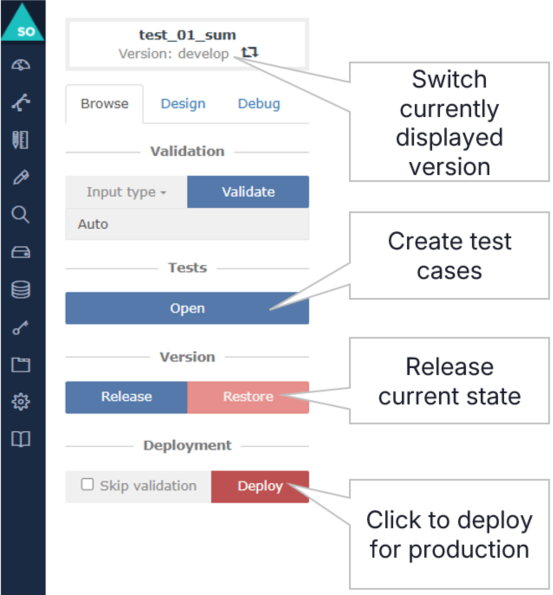
These controls provide quick access to:
- switching scenario versions,
- creating new release versions,
- restoring a version to develop,
- deploying a selected release.
This layout ensures that version operations are always visible and easy to use, even for complex scenarios.
Switching between versions: safe exploration without editing risks
To switch to another scenario version, users click the version selector at the top of the editor. This opens a window listing all available versions, including develop, released versions, and the deployed version.
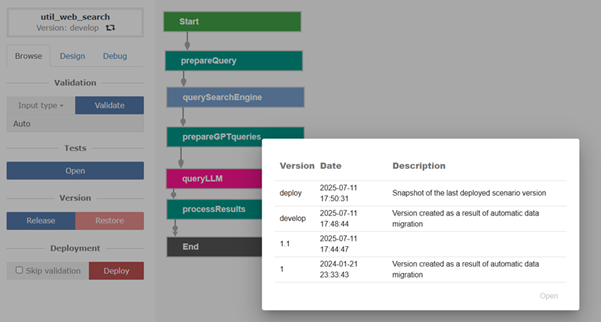
When a non‑develop version is opened:
- the scenario loads in read‑only mode,
- users can inspect graph nodes and properties,
- validation or deployment actions are available.
To modify a read‑only version, it must be restored to the develop version.
⚠️ Important: Restoring a version overwrites the current develop version.
This mechanism ensures that accidental edits of stable configurations are impossible.
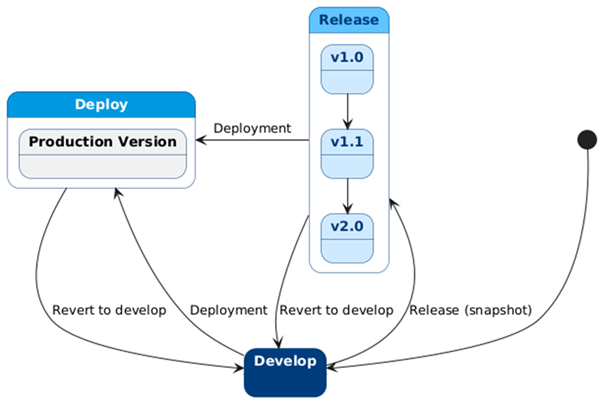
All possible states and transitions between states are illustrated on the graph below.
The value for data science, ML engineering, and business teams
Data Scientists
- Experiment freely without risk to production logic.
- Access historical versions for comparison and debugging.
- Create clean milestones when logic stabilizes.
ML Engineers / MLOps Teams
- Consistent deployment flow based on immutable releases.
- Improved auditability and operational safety.
- Simplified integration with deployment pipelines.
Business & Compliance
- Clear documentation via version tags and descriptions.
- Transparent release management.
- Reduced risk of unintended changes.
How versioning improves model governance and change management
In enterprise environments, governance, traceability, and reproducibility are as crucial as model accuracy. The new versioning functionality directly supports these aspects by:
- enabling scenario snapshots aligned with audit cycles,
- ensuring that production logic is always tied to an immutable release,
- simplifying investigation of historical decisions,
- providing clear visibility into the lifecycle of scenario changes.
This makes Scoring.One better suited for regulated industries, high‑volume decisioning systems, and teams that require strong operational discipline.
Best practices for using versioning in Scoring.One
To get the most out of version management, consider the following practices:
Use “develop” for all experimental and iterative work
Treat it as your working branch - flexible and continuously changing.
Create release versions at meaningful milestones
For example:
- after validation,
- before handoff to QA,
- after business sign‑off.
Deploy only the versions that passed full validation
Deployment should always rely on a stable release version.
Use descriptive tags and meaningful version notes
Good naming conventions significantly improve collaboration, especially in cross‑functional teams.
Conclusion: a reliable, transparent, and production‑ready versioning workflow
The introduction of Scenario Version Management in Scoring.One is a major enhancement for anyone building data‑driven decision logic. By cleanly separating development, release, and deployment, Scoring.One now supports safer experimentation, more predictable releases, and precise control over production behavior.
This upgrade strengthens Scoring.One as a professional platform for ML‑driven scoring, ready for enterprise‑scale governance and operational requirements.