The data requirements differ, depending on the approach taken to build the scoring card (manual or using the regression model) In the case of manual card building numerical as well as categorical attributes are allowed but missing values are not supported. To use data with missing values it is necessary to replace them before building the card. Otherwise all missing values will be assigned to the No Information level. In the case of building the card using the regression model, the data should satisfy the requirements of the logistic regression model (see the Logistic Regression chapter). In both cases the data set for constructing a scoring card should contain a binary target attribute.
There are two approaches to building scoring cards. It is possible to build the card 'manually' using only expert knowledge or on the basis of a logistic regression model. With the regression model approach the user obtains a scoring card with pre-calculated values for parameters such as points, being good and WoE.
- Building the scoring card manually
In this approach a model will be built with intervals for selected attributes, but all parameters will be empty. The user has to assign the points himself. It is also possible to edit the created intervals.
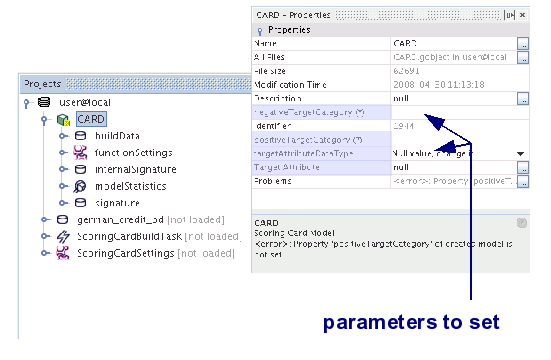
Manual scoring card building is performed in the standard way. The complete procedure is described in the chapter AdvancedMiner in Practice. Scoring Card building is realized by the MiningBuildTask with ScoringCardSettings. After executing MiningBuildTask a new scoring card will appear in the MR repository. It needs to be filled with points. It also requires setting some additional parameters concerning the definition of the target. All of these are general properties of the card model, which will be necessary to test the card.
- Building a scoring card with a regression model
In this approach the card model is built on the basis of previously built logistic regression model. The card build in this way uses the points derived from the regression model. Also, some additional parameters (such as 'Weight', 'BeingGood') are available. oreover, the regression model provides access to all its useful capabilities such as AutomaticVariableSelection.
The scoring card building process with aregression model consists of two sub-processes. The first one is building the logistic regression model. This part is performed in the standard way, described in the chapters: AdvancedMiner in Practice (Classification model building) and Logistic Regression. The second sub-process is converting the regression model into a scoring card. This part is performed by the MiningBuildTask with ScoringCardSettings with regressionModel added.
After defining and executing both tasks (logistic regression model building task and scoring card building task) a new scoring card will appear in the MR repository with all the statistics calculated.

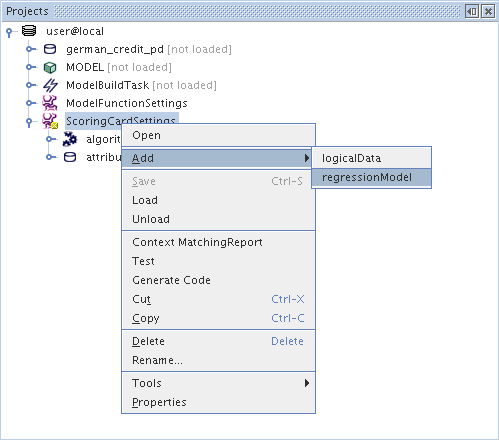

In both approaches to scoring card building it is possible to edit all the parameters of the card: attributes, intervals and points. The user can add/remove attributes, edit levels, set his own points and define labels on the card.
In the case of the manual building process there are no restrictions on editing the card. The user can freely modify the card. One only has has to remember about saving the changes done to the card. In the case of building a scoring card with a regression model it is necessary to recalculate the points on the basis of regression model after editing the card. This can be done in the following way:
- save all the changes done to the card
- add the changed card as an inputModel to the scoring card building task
- execute the scoring card building task.
The new card with the recalculated points will appear in the repository.
Note
There is a restriction on editing the card build on the basis of a regression model. In order to recalculate the points the signatures of the regression model and the modified card must be the same. Otherwise only 'Custom Points' can be set and other statistics ('Being Good' , 'Weight') will be lost.More information about editing the cards can be found in the Model statistics section.
There is one additional very practical way of combining both approaches to scoring card building. In the case when the analyst needs to prepare several variants of the scoring cards it is possible to proceed in the following way:
-
step 1:
- manually build a basic scoring card ('BASIC_CARD')
- work on the general appearance of the card: number of levels, level bounds, labels, descriptions, order of attributes, mapping e.t.c. Make the card easy to read, compare and evaluate. This card will serve as the template for the cards which will be created later.
-
step 2:
- build the final scoring card on the basis of a regression model
-
start the scoring card building process with the logistic regression model
as described in the previous section
- step 2a: build a logistic regression model ('MODEL')
-
step 2b: create a scoring card build task with following settings:
- use 'MODEL' as regressionModel in the scoring card settings
- use 'BASIC_CARD' as the inputModel in build task
- set 'FINAL_CARD' as the name of the final scoring card
The picture below show the metadata repository after performing the steps described above.
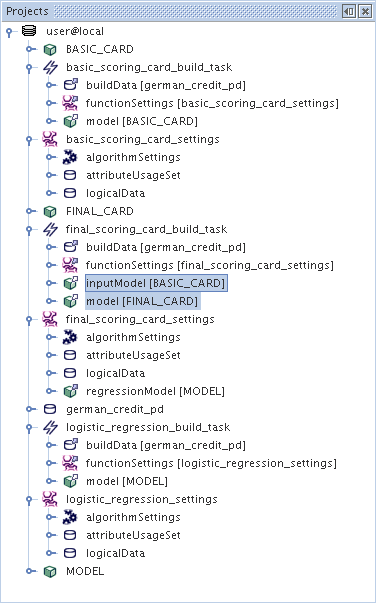
After the first step the analyst can carry out the second step repeatedly, changing some settings in the regression model. In this way all the created final cards (changing as the logistic regression models change) will have the same appearance as the basic card. This will make it easier to e.g. compare the models and select the best one.
Note
- If the logistic regression model has more variables that basic card then the additional ones will be added to the final card.
- If the logistic regression model has fewer variables that basic card then the excessive ones will be removed from the final card.
Scoring card has the following algorithm settings:
Table 40.1. Scoring card: General Algorithm Settings
| Name | Description | Possible values | Default value |
|---|---|---|---|
| atPoints | The points level corresponding to odds for the PDO Scaling algorithm | positive integer numbers | 300 |
| Automatic Data Transformations | This option is ignored for the scoring card module. | - | - |
| Intervals from PhysicalData | if TRUE then the algorithm will use the intervals defined in PhysicalData (throught Freq), otherwise the intervals will be taken from function settings | algorithmSettings | attributesSettings | TRUE / FALSE | FALSE |
| Max Number of Points | The maximum value of points allowed for a level of an attribute. The upper bound for points scale. Used with the MaxPointsScaling algorithm | Positive integer numbers | 100 |
| Maximum For NoAnswer | If TRUE then the maximum from points of all levels will be ascribed to the additional No Answer level. Otherwise the minimum will be ascribed. | TRUE / FALSE | FALSE |
| Number of Intervals | The number of intervals created for an attribute. | Positive integer numbers | 5 |
| odds | The odds corresponding to atPoints in the PDO Scaling algorithm | positive floating point numbers | 10 |
| pdo | the number of score points which results in the doubling of odds used by the PDO Scaling algorithm | ||
| Swap Points | If TRUE the card will model the oposite category as the regression model, FALSE otherwise. | TRUE / FALSE | TRUE |
| Use Logical Data | If TRUE then the types of the attributes will be taken directly from logical data; otherwise they will be recognized automatically (i.e.. variables containing '__' in their names will be treated as categorical). | TRUE / FALSE | FALSE |
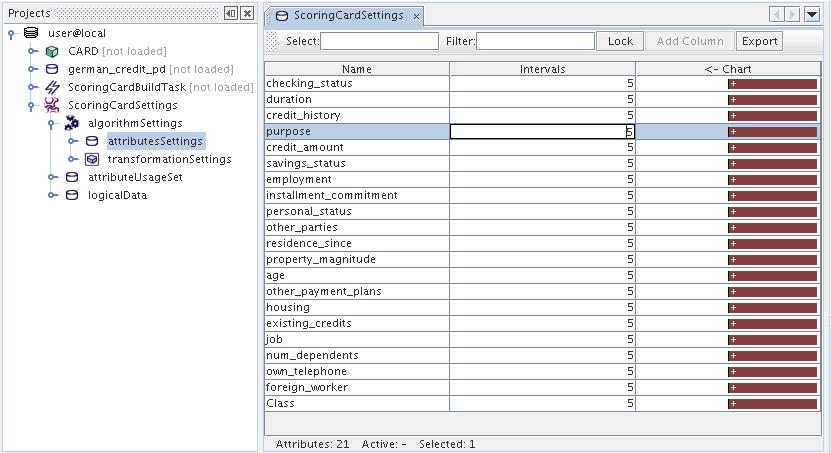
After creating the card the user can browse its details by double-clicking the model icon. The figure below presents the card editor and the card properties. The following animations show how to edit the card editing manual card, editing card with regression model.
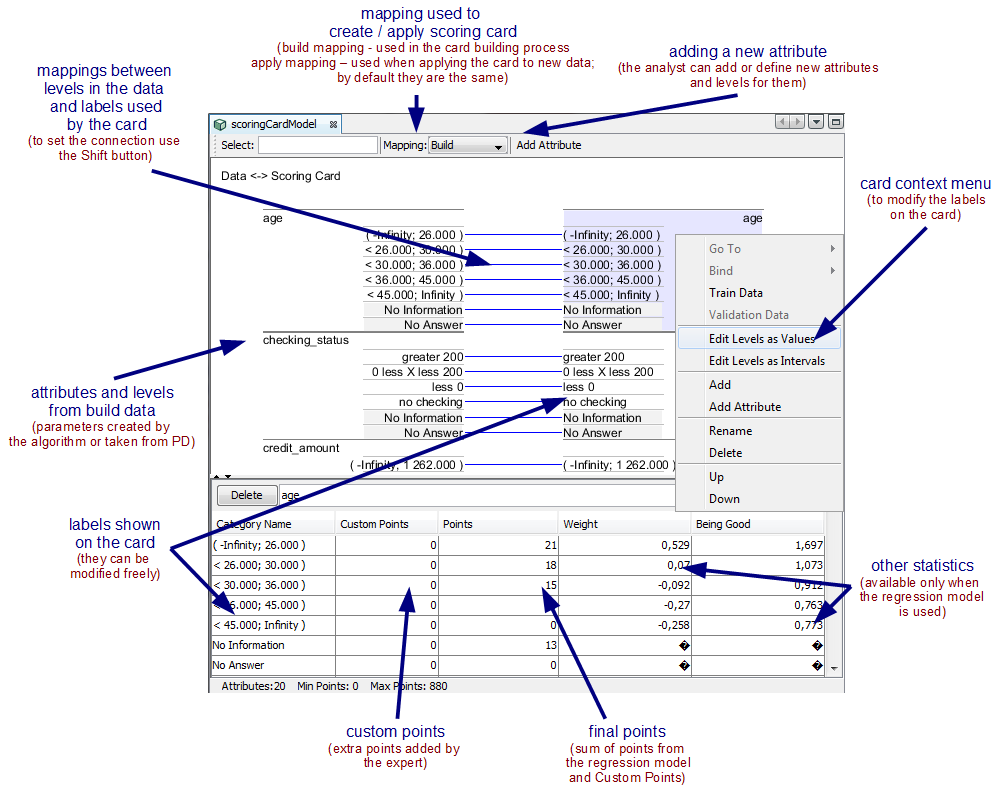
Table 40.2. Scoring Card Model Properties
| Name | Description |
|---|---|
| Liberal Execution | if TRUE 'liberal' execution is preferred (do not stop on minor errors) |
| negativeTargetValue | negative category value for the target attribute |
| positiveTargetApriori | the a priori probability of the occurrence of a positive category |
| positiveTargetValue | positive (event) category value for the target attribute |
| targetAttributeDataType | the type of the target variable |
| Target Attribute | the name of the target attribute |
| useApplyMapping | if TRUE applyMapping will be used during Apply and Test task execution; otherwise buildMapping will be used (the used mapping parameter is shown on the picture of Scoring Card Editor) |
Note
The default values may differ depending on the card was built: manual or with a regression model. In the second case some parameters are taken from regression model settings.Model testing is performed in the stardard way using the ClassificationTestTask regardless of how the card was built. It is important to set proper cut-off.
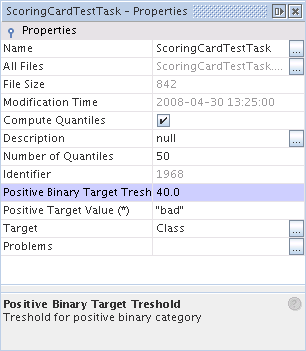
The scoring card model can be applied to classification problems.
The scoring card module is capable of creating two possible output types when classifying the provided data: category or probability. For details on how to apply the model to the data see the Applying Models in AdvancedMiner chapter, and the Classification subsection in the Applying for different mining functions section.
The table below presents the possible combinations and their descriptions.
Table 40.3. Output item and output item type combinations
| Output Type | Output Item Type | Description |
|---|---|---|
| probability | rank | returns the score of the n-th best category |
| probability | category | returns the score of classifying as the given category |
| category | rank | returns the n-th best category |
| category | category | not supported |
| nodeID | rank | not supported |
| nodeID | category | not supported |
Note
The final class is being assigned according the following rule:-
for each record two kinds of points are calculated:
- for the positive target category: the sum of points from the scoring card
- for the negative target category - the difference between the maximum of points possible to get and points for positive target category
- the winner class is the category which got more points.