Variable Selection has no specific data requirements. Refer to the Data Requirements section in the chapter describing the selected algorithm.
Model building and testing is performed in the standard way. The complete procedure is described in the AdvancedMiner in Practice chapter. Refer also to the corresponding section in the chapter describing the selected algorithm.
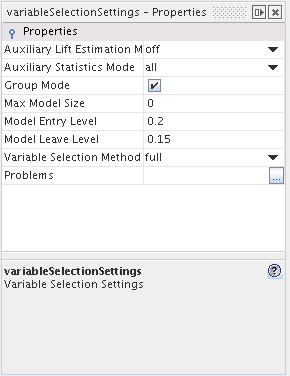
Variable Selection has the following algorithm settings:
Table 28.1. Variable Selection Settings
| Name | Description | Possible values | Default value |
|---|---|---|---|
| Auxiliary Lift Estimation Mode | enables the estimation of transitional models; (connected with Classifiaction) | off / fit / aproximate | off |
| Auxiliary Statistics Mode | determines if auxiliary statistics are stored in a variable selection object. If the 'off' option is selected, auxiliary statistics are not stored, if the 'importance' option is selected, only the importance and score statistics are stored. The 'all' option stores all statistics such as importance,score and beta; (connected with Classifiaction) | off / importance / all | all |
| Group Mode | selects the variable selection mode: selection of individual variables versus selection of variable groups | TRUE / FALSE | TRUE |
| Max Model Size | specifies the maximum size of the final model selected by the automatic variable selection method | non-negative integer numbers | 0 |
| Model Entry Level | the threshold p-value of the model-dependent Residual Statistic for variable insertion. Taken into consideration only if forward selection or stepwise method has been selected | real numbers from the interval (0,1) | 0.2 |
| Model Leave Level | the threshold p-value of the model-dependent Residual Statistic for variable removal. Taken into consideration only if backward elimination or stepwise method has been selected | real numbers from the interval (0,1) | 0.15 |
| Variable Selection Method | specifies one of the available variable selection methods | full / forward / backward / stepwise / bestSubset | full |
- Auxiliary Lift Estimation Mode
There are two base lifts, the first is calculated for training data (always calculated), and the second one is calculated for validation data (if validation data is specified for the model build task). In addition to these two base lifts there are also auxiliary lifts which are calculated for transitional models. A transitional model is derived from main model, and is built by removing one of variable. The auxiliary lifts can be constructed in two ways. The first way is to estimate the lifts after the final model is built. In this case all the lifts derived from the final model signature are taken into account (by rejecting the variables one by one and refitting model without one variable). In order to calculate the lifts in this manner it is necessary to choose the fit option. The second way is to re-estimate only those lifts which were not calculated earlier, at the variable selection stage. In order to calculate the lifts in this manner it is necessary to choose the approximate option.
Remarks
For the Newton estimation method both options are equivalent.
If the approximate option is chosen then to calculate the lifts it is also necessary to choose the Auxiliary Statistics Mode: all option.
- Auxiliary Statistics Mode
Auxiliary statistics are calculated to determine which variables or group of variables will be selected in the model building process. As it is shown below, auxiliary statistics are calculated for every iteration (step). The variable selection algorithm is quite simple. The importance statistics for variables are calculated and the variable with the highest statistic value is chosen. The selected variable is added to the model building process, and remove it from the set. In the following iteration (step), the importance statistics for the remaining variables or groups of variables in set are calculated.
Auxiliary statistics include:
- score (Auxiliary statistics mode = all/importance)
- importance (Auxiliary statistics mode = all/importance)
- beta (Auxiliary statistics mode = all)
- Group Mode
In some cases the variables in the data are not independent, but represent some concept together as a group. One example can be the result of the binarize transformation, where each of the resulting binary variables represents a single level of the original categorical variable. In such cases the user may want to include or exclude the whole group of variables at once, instead of testing them separately. Such approach is available by switching this option on.
Groups of variables can be specified in Attribute Usage Set (refer to the Advanced Topics section in the AdvancedMiner Concepts part of the documentation). Groups may consist only of active variables. If a group contains no active variables it will not be created and taken into account. In conformity to the general rules, all obligatory variables will be included in the final model and all inactive variables will be excluded from it.
- Max Model Size
To control the computational cost of the variable selection process and to enhance generalization properties of the model, the user may want to specify the maximum number of variables (or groups of variables) to include in the final model. The specified value corresponds to the total number of explanatory variables which can be present in any model examined by the variable selection method, including obligatory variables and excluding the optional Intercept variable.
In the case of backward elimination method, this option has priority over the Model Leave Level option. It means that all the least significant variables will be successively removed regardless of their p-values until the threshold for the allowed model size is reached. Next, if any of the remaining variables in the model have significance below the Model Leave Level , they will also be removed in subsequent backward elimination steps.
The default value for this option is 0, which means that the final model size will not be limited in advance. If the specified positive value is less than the number of obligatory variables in the data, then the model containing only the obligatory variables will be returned as the final model. If the group mode has been switched on then this option refers to the number of groups of variables included in the model, not to individual variables. Obligatory variables and variables which are not assigned to any group are treated as one element groups.
If the selected Variable Selection Method is other than full, then the p-value for the model-dependent Residual Statistic is displayed for each step of the algorithm (see the Variable Selection History table in the Model Statistics panel of the corresponding model).