Syntax:
IMPORT [ COMPRESSED ] TABLE source-table-name
AS destination-table USING ODBC (odbc-alias[ + coded-odbc-alias][, ENABLE_SQL_GD_BOUND_EXTENSION | DISABLE_SQL_GD_BOUND_EXTENSION])
[ ON ERROR ABORT | IGNORE | CAST ]
[ NUMERIC AS type][[,] colName-1 AS type[, colName-2 AS, ...]]
or
IMPORT QUERY:
    query-content-line-1
    [query-content-line-2]
    [...]
AS destination-table USING ODBC (odbc-alias[ + coded-odbc-alias][, ENABLE_SQL_GD_BOUND_EXTENSION | DISABLE_SQL_GD_BOUND_EXTENSION])
[ ON ERROR ABORT | IGNORE | CAST ]
[ NUMERIC AS type][[,] colName-1 AS type[, colName-2 AS, ...]]
Explanation:
source-table-name is a string with the name of the table to import in the source database. This string is appended to the SELECT * FROM statement which is executed in the source database.
The optional COMPRESSED keyword causes the created table to be compressed, with each row being compressed separately. In the case of tables with a lot of columns this may lead to up to 2.5 times decrease in the size of the table, while for tables with few columns the gain in space occupied on disk may be much less significant. The compression algorithm always checks whether compressing a row would lead to smaller disk space usage and if not, the row is not compressed.
Note
Compressed tables cannot be read by GDBase versions prior to 2011.04.11.destination-table is the name of the table to which the imported data will be written.
query-content-line-n is an element of the block of query code which will be passed on to the source database. These lines should be indented.
odbc-alias is a string which contains a list of keywords with attribute values used to create the ODBC connection string. If a keyword is repeated, only the first occurrence is valid. Keywords are separated by semicolon (;). Attributes that contain non-alphanumeric characters should be contained in braces ({ .. }).
odbc-alias may contain the following keywords:
DSN – name of data source. DSN=DEFAULT forces the use of the driver for the default data source.
FILEDSN – name of a .dsn file.
DRIVER – name of the ODBC driver
UID – user ID
PWD – password corresponding to the user ID, or an empty string (PWD=;)
SAVEFILE – the name of a .dsn file in which the attribute values of keywords should be saved if the connection is successful. The SAVEFILE keyword can only be used with the DRIVER keyword.
Other keywords may also be optional or obligatory, depending on the ODBC driver used.
The driver for the source database is determined using the attribute values of DRIVER, DSN, or FILEDSN keywords, according to the following rules:
If the DRIVER keyword is present, the specified driver is used.
If the DRIVER keyword is not present and the DSN keyword is present, the driver for the source database is determined on the basis of its value.
If neither the DRIVER nor DSN keyword is present and the FILEDSN keyword is present, then the driver/connection is determined on the basis of the information contained in the specified .dsn file.
If none of the DRIVER, DSN or FILEDSN keywords is present or the specified data source is not found, the driver for the default data source is used.
If the specified data source is not found and the default data source is not specified, an error is returned.
The DISABLE_SQL_GD_BOUND_EXTENSION argument forces the driver not to use the SQL_GD_BOUND extension, even if it is supported, and the alternative ENABLE_SQL_GD_BOUND_EXTENSION causes the driver to use the SQL_GD_BOUND extenson if it is supported. If neither of these option is included the SQL_GD_BOUND extension will not be used.
Data type conversion rules when importing using ODBC drivers are explained in the Data types in imported data section.
The optional ON ERROR clause specifies the behavior in the case when it is not possible to import the values from one or more columns due to type mismatch:
ABORT – the import operation is aborted and an error message is returned; this is also the default behavior when the ON ERROR clause is omitted,
IGNORE – the problematic column is dropped; it will not appear in the destination table.
CAST – the problematic column is converted to TEXT type and the values from this column are converted to strings upon import.
It is possible to specify type casting behavior during the import operation. The optional ON NUMERIC clause specifies that all floating point values (SQL_DECIMAL and SQL_NUMERIC) should be cast to the type specified by type, where type can be TEXT, REAL or INTEGER. If TEXT is used, the floating point value is converted to string according to the capabilities of the ODBC driver. If INTEGER is used, floating point values are rounded to nearest integers.
It is also possible to cast selected columns to specified data types using the optional col-name AS type clauses.
Note
Ultimately, which columns can be converted to which types depends on the capabilities of the ODBC driver used.
Example 44.1. Simple ODBC import command
sql:
    IMPORT TABLE '`date`' AS d USING ODBC('DSN=mysql;;UID=username;PWD=password') ON ERROR CAST
The use of ON ERROR CAST clause guarantees that the table import process will complete regardless of type mismatches; the columns with mismatched types will have string type in the imported table.
Example 44.2. ODBC import with no DSN configuration
sql:
    IMPORT TABLE 'vic.abc' AS abc USING ODBC('Driver={SQL Server};SERVER=VICS\SQLEXPRESS2005;UID=vic;PWD=vic;')
Example 44.3. Using IMPORT QUERY
sql in 'project_15_gdbase':
    IMPORT QUERY:
            SELECT
                    id_client,
                    id_contract,
                    data_1,
                    data_from
            FROM
                    Service_Stats_History_A1
            WHERE
                    id_client IS NOT NULL
                    data_1  > '2015-12-31'
    AS extract1 USING ODBC('DSN=teradata;UID=enterusername;PWD=enterpassword')
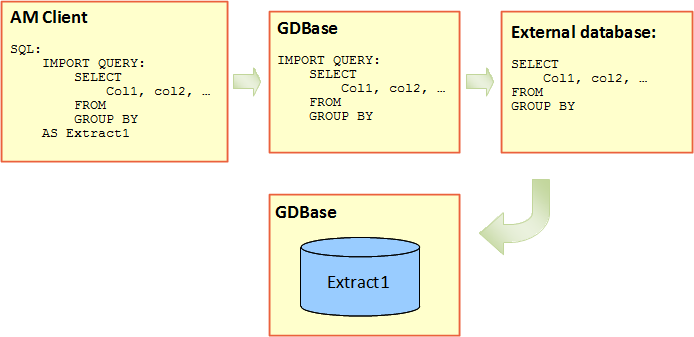
In this example the IMPORT QUERY code is sent to a GDBase database with the project_15_gdbase alias. GDBase sents the query content (which begins after QUERY and is indented to the right) to a database depicted as DSN=teradata. It is possible to view the progress of receiving the data from the external database in the Processes component of the AdvancedMiner user interface. The content of the query will be saved in the specified GDBase database in a table named Extract1. If the query contains an error or it failed for any other reason, GDBase will log the errors reported by the external database.
Syntax:
EXPORT source-table-name INTO TABLE full-destination-table-name [ (catalog | NULL, schema | NULL, destination-table-name ) ]
USING ODBC ) odbc-alias[+coded-odbc-alias]
Explanation:
source-table-name is the name of the table to export from the source database.
full-destination-table-name is a string which specifies the name of an existing table in the destination database to which the data from source-table will be exported.
catalog is a string which specifies the catalog of the destination table.
schema is a string which specifies the schema for the destination table.
destination-table-name string is the name of the destination table.
If the catalog, schema and destination-table-name parameters are omitted, their values are assumed to be equal to NULL for catalog and schema, and full-destination-table-name for destination-table-name. These three parameters can be omitted when full-destination-table-name is unambiguous without specifying the catalog and schema parameters, and full-destination-table-name is the name of the table without any extra characters (such as TableOne vs. “TableOne”)
odbc-alias is explained here .