Usage

Data requirements

The most important data requirements are:

  • the target has to be categorical for classification task and numerical for approximation task;
  • all variables except the target should be numerical;
  • it is recommended to standardize all variables except the target (for approximation problems the target should be normalized);
  • missing values are not supported.

Model building and testing

The basic procedure of model building is described in the AdvancedMiner in practice chapter (see the sections Classification model building and Approximation model building). The full specification of model settings contains also the elements of algorithm settings: General Algorithm Settings, Learning Algorithm, Neural Layers and Transformation Settings.

It is possible to terminate the model building process (by selecting the Terminate Process in the process context menu). If possible, the partially trained model can be accessed. A model obtained in this way can be used like any other normally created model.

The procedure of model testing is described in the sections Classification model testing and Approximation model testing, respectively.

Algorithm settings

General Algorithm Settings

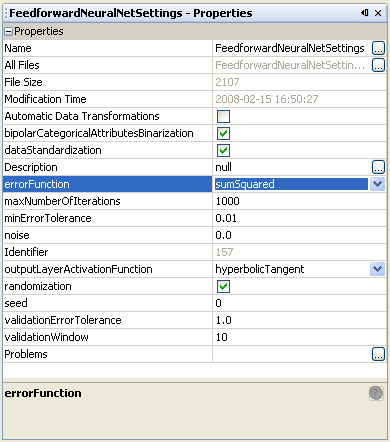
Table 34.1. Feed Forward Neural Networks: General Algorithm Settings
NameDescriptionPossible valuesDefault value
Automatic Data Transformations if TRUE automatic transformations (e.g. replaceMissing, binarization) should be executed, false otherwise. TRUE / FALSEFALSE
bipolarCategoricalAttributesBinarization if TRUE then categorical values are binarized to bipolar values, otherwise to unipolar values TRUE, FALSETRUE
dataStandardization TRUE, FALSETRUE
errorFunction the function used to compute the neuron output error sumSquared, cityBlocksumSquared
maxNumberOfIterations the maximum number of iterations of the learning process non-negative integer numbers1000
minErrorTolerance the stop criterion for the learning algorithm: the maximum acceptable error value for the training data real non-negative numbers0.001
noise the variance of noise added to the data; when the value of this variance is equal to or less than zero then noise is not added real numbers from the interval [0.0,1.0]0.0
outputLayerActivationFunction the activation function for the output layer logistic, hyperbolicTangenthyperbolicTangent
randomization decides whether to randomize the order of the training data in each iteration TRUE, FALSETRUE
seed the seed for random generator; when the value of this seed is equal to zero random generator is initialized with a random value real numbers0
validationErrorTolerance the tolerance for the error calculated on the validation data; the learning process will be stopped when the value of current error calculated on validation data is greater than the value of the minimum ever calculated validation error multiplied by this tolerance positive real numbers greater or equal to 1.01.0
validationWindow the Interval of fitting error calculation on the validation data. When the fitting error calculated on the validation data is growing, the learning process will be stopped. When the value of this variance is equal to zero or the validation data is not specified then this option is turned off positive integer numbers10

Figure 34.4. Feed Forward Neural Networks: Algorithm Settings

Feed Forward Neural Networks: Algorithm Settings
Learning Algorithm Settings

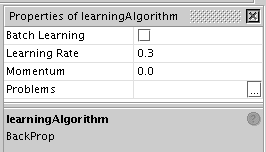
Table 34.2.  Feed Forward Neural Networks: Learning Algorithm Settings
NameDescriptionPossible valuesDefault value
Batch Learning enables/disables the batch learning process (faster but less accurate) TRUE, FALSE (if available)FALSE
Learning Rate the value of the learning rate real numbers from the interval [0.0,1.0]0.1
Momentum the memory of the previous change of neuron weights real numbers from the interval [0.0,1.0]0.0

Figure 34.5.  Feed Forward Neural Networks: Learning Algorithm Settings

Feed Forward Neural Networks: Learning Algorithm Settings
Settings for Neural Layers

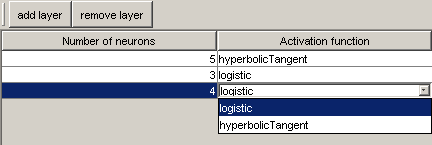
The user can decide about the structure of the hidden layers. A special editor is launched after double-clicking on neuralLayers in the algorithmSettings sub menu.

Figure 34.6. Feed Forward Neural Networks: Neural Layers Settings

Feed Forward Neural Networks: Neural Layers Settings

The activation function and the number of neurons for each layer can be chosen. New layers can be added and existing layers deleted. It is also possible to delete all the hidden layers. However, the number of neurons should never be set to 0 or less, as this can cause errors.

In addition to the settings specific to the Neural Network algorithm, the user can use Transformation Settings - to control the way of data transformation; these settings are described in the Transformation chapter.
Model statistics

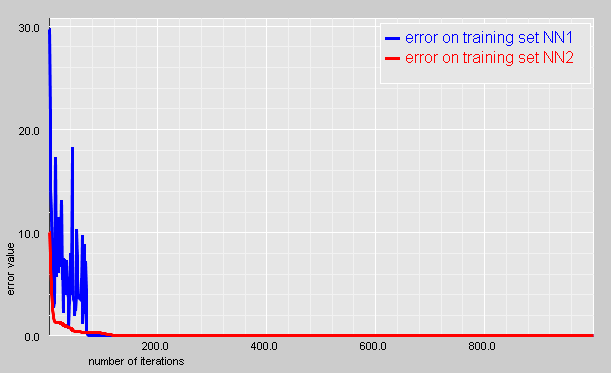
There are no statistics for the Neural Networks model available in AdvancedMiner. It is only possible to visualize the history of the learning error rate.

Figure 34.7. Feed Forward Neural Networks: history of the learning error rate

Feed Forward Neural Networks: history of the learning error rate

Model application

The results of the Feed Forward Neural Networks module are:

  • predictedValue for Approximation,

  • predictedCategory and probability for Classification.

Table 34.3.  Feed Forward Neural Networks: Possible Apply Output for Approximation

Output type Description
confidencenot supported
predictedValuepredicted value

Table 34.4.  Feed Forward Neural Networks: Possible Apply Output for Classification

Output type Description
nodeIdnot supported
predictedCategorypredicted category name
probabilitythe probability of a correct prediction