The most important features available in the Matching Module are:
- use one of field comparison methods implemented in AdvancedMiner, e.g. jaro, qgram, levenshtein, zip or strict string comparison
- define your own comparison method in Java (so called custom matching)
- divide the data into blocks to speed up the deduplitacion process: set the block usage option for the blocking attribute
- compare blocks between each other, e.q. block with the attribute name equal to "John" and blocks with all the other names; basically it means matching two datasets - the first one with the chosen attribute equal to some value V and the second one with that attribute not equal to V
- for every attribute set a weight which by which the comparison result will be multiplied
- apply a preprocessing algorithm on a selected attribute - it may be predefined (e.g. ignore case) or custom, written in Java
- use one of two decisive algorithms to evaluate the similarity of records: Weighted Matching Algorithm, which simply adds all similarity values of the attributes with some weights or Probability Matching Algorithm, which behaves like the classical Fellegi and Sunter classifier, summing logarithms of the attribute similiarity values multiplied by the appriopriate agreement and disagreement weights
- limit the output size relative as a percentage of the input size
- prepare a histogram for the "score" value with arbitrarily set number of intervals and show it in Freq
Record matching can be processed on both numerical and categorical data.
Extra conditions are present when setting the set identifier (id) attribute: it must have unique values, must not containt any missing values and has to be the only column of that type.
For every attribute one can specifty how AdvancedMiner should deal with missing values: ignore nulls or assume a constant similarity/distance value ("Null Similarity")
As described in the AdvancedMiner in practice chapter, model building consist of:
- choosing the input physical data - ipd
- creating and configuring a new mining function (WeightedMatchingFunctionSetting or ProbabilityMatchingFunctionSettings) - mf
- creating and configuring a new matching task (MatchingTask) - mt
- adding a new logical data based on ipd to the mf
- adding mining function settings, physical data (ipd) and target (output physical data) to mt
- configuring the matching process by choosing appropriate settings in matching function settings, matching function task and mining function's attribute usage set
- executing the matching task
Choosing Weighted Matching Function Settings entails using Weighted Matching Algorithm Settings by default and Probability Matching Function Settings entails Probability Matching Algorithm SettingsS. Different Attribute Usage Sets are used for both types of function settings as well.
In the figure below depicting the function settings window only one parameter (maximum output size) has a direct impact on the results. Both the Weighted Matching Function Settings and Probability Matching Function Settings have the same properties window.

Table 33.1. Matching: Function Settings

Table 33.2. Matching: Algorithm Settings
Table 33.3. Data Quality: Weighted Matching Algorithm Settings
| Name | Description | Possible values | Default value |
|---|---|---|---|
| Normalize score | If set to true the score values are normalized to range <0,1> | boolean | false |
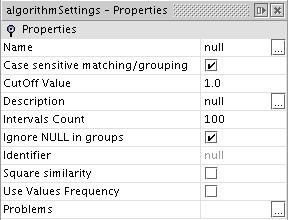
Table 33.4. Data Quality: Probability Matching Algorithm Settings
The table below describes the attribute usage set common to both Weighted and Probability matching algorithms
Table 33.5. Data Quality: Attributes Usage Set
| Name | Description | Possible values | Default value |
|---|---|---|---|
| Name | attribute name | not editable | attribute's name |
| Usage | how should the given attribute be used | id, match, groupBetween, block, inactive | match |
| Group | not used | ||
| Algorithm | the matching algorithm if usage is set to match | qgram2, qgram3, jaro, strict, levenshtein, zip, custom | jaro |
| Null Similarity | When a value is compared with a missing value how should it be treated? This field's value is returned as the comparison result. | positive real number from the range <0,1> | 0.5 |
| Min Similarity | When two records are compared using on of the attributes the comparison result must be greater or equal to this minimal similarity value; in other case the processed pair will be classified as a non-match | positive real number | 0 |
| Custom Matching | code for the custom matching procedure. | text: Java code | empty |
| Use Custom Preprocessing | Is there any preprocessing to be done on that attribute values? | boolean | false |
| Custom Preprocessing | The implementation of the custom preprocessing algorithm | text: Java code | empty |
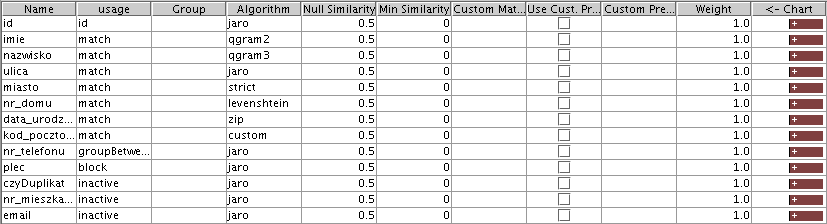
Table 33.6. Data Quality: Attributes Usage Set (Weighted Matching)
| Name | Description | Possible values | Default value |
|---|---|---|---|
| Weight | How important is the given attribute; the comparison result (similarity value) will be multiplied by that weight | positive real number | 1.0 |
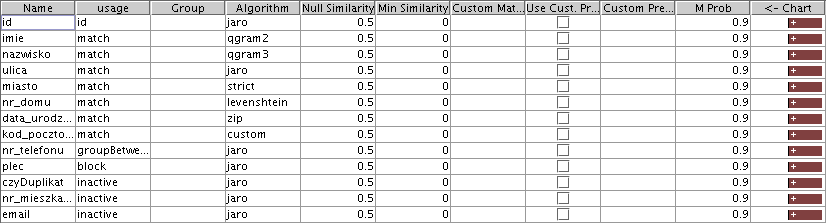
Table 33.7. Data Quality: Attributes Usage Set (Probability Matching)
- Usage
The possible values for that field are:
- id - use as the unique identifier; there can be only one field with that type of usage set; the attribute's values must be unique and there can't be any missing values
- match - use this attribute as a matching field; user should also choose the comparison method (Algorithm column)
- block - divide the data set into blocks grouping by this attribute
- groupBetween - divide the data set into blocks and compare the elements between different blocks; it can be set only for one attribute and additional setup has to be done using methods available only from a Gython script
- inactive - don't use this attribute it any way
- Algorithm
Possible values for that field are:
- jaro - the jaro metric
- qgram2 - the 2-gram metric
- qgram3 - the 3-gram metric
- strict - strict (char by char) string comparison
- levenshtein - the Levenshtein metric
- zip - the length of the compressed representation of a given string (for details see here and here)
- custom - an attributes comparator is written in Java by the user; at this time it is available only via Gython scripts and not in GUI
The result of the matching process is a table with a number of columns among which the three ones given below are always present:
- id1 - the id of the first record in pair
- id2 - the id of the second record in pair
- score - the final score evaluated using the attribute scores
- ATTRIBUTENAME_score - the comparison result for the given attribute
The dataquality Gython library provides mechanisms for the analysis of the matching results. The library can be imported in the following way:
from specialized.dataquality import *
The library provides the matching_results function, which creates an Excel spreadsheet with a report on the outcome of the matching process.
Syntax:
matching_results(buildTaskName, sourceData, sourceDataId=None, cutOff = 0.0, dbType='SQLITE', silent=0)- buildTaskName - the name of the task used to perform the matching
- sourceData - the source table name
- sourceDataId - the name of the attribute that was set as the id
- cufOff - process only matches with score above this value
- dbType - the database type
- silent - silent or verbose operation