The following script presents the abilities of the Classification Trees module in AdvancedMiner. Please note that this script does not include the data, which is required to run it in the AdvancedMiner Client. The full source with the data can be found in the Examples appendix.
An example how to apply the created model can be found in the Applying in AdvancedMiner chpter.
Example 30.1. Building a tree model
# Description:
#    This example shows how to create a decision tree classifier.
#    The dataset used is 'zoo'. The predicted target id is 'catsize'.
#    The algorithm tries to learn on other attributes, whether
#    animal size is catsize or not.
#
#   animal attribute is turned off
#   (by setting its usage to inactive)
#
# Remarks:
#   This script uses data which was generated by the "zoo" script from
#   the "data" folder

if not tableExists('zoo'):
 raise "Table 'zoo' does not exists. Please run zoo.gy script from data directory first"


# Create building task object, this will produce
#  sample_cl_settings, and after executing this
#  task, created_model will also be available
bt = MiningBuildTask('zoo_data', 'zoo_cl_settings', 'created_model')

# Create physical data from a previously prepared dataset
pd = PhysicalData('zoo')

# Generate logical data from physical data
ld = LogicalData(pd)

# New Classificatin function settings
fs = ClassificationFunctionSettings()

# the generated logical data is assigned to function settings
fs.logicalData = ld

# Turn off attribute animal from learning
fs.attributeUsageSet.getAttribute('animal').usage =\
 UsageOption.inactive

# TargetAttribute name describes which value is taken as the
# target for classification
fs.targetAttributeName = 'catsize'

# Will use Decision Tree algorithm settings
fs.algorithmSettings = TreeSettings()

# Sets the minimal sample count for node to 1
fs.algorithmSettings.minNodeSizePrc = 1

# Sets the split evaluation fuction used when the tree is built.
fs.algorithmSettings.splitEvaluation = SplitEvaluation.entropy

# Sets the maximum child node count to 10
fs.algorithmSettings.maxNodeRank = 10

# All created objects have to be saved in the metadataRespository
save('zoo_data', pd)
save('zoo_ld_train', ld)
save('zoo_cl_settings', fs)
save('zoo_building', bt)

# And finally build task is executed
print "Executing build task"
execute('zoo_building')
print "Model 'created_model' created"
print "\nEnd of script"

# Description: queries existing model for rules in leaves

# load the model
model = load('created_model')
# printing rules
print "Rules in leaves:"
# iterate over all leaves, the current leaf is assigned to the
# leaf variable
for leaf in model.modelStatistics.allLeaves:

    # print some node statistics
    print "**Node %d, count: %g" % (leaf.nodeID, leaf.count)
    print 'RULE:'
    print leaf.nodeRule
    print 'Predicted value:'
    print leaf.getPredictedValue()
    print '---'
Output:
Executing build task
Model 'created_model' created

End of script
Rules in leaves:
**Node 1, count: 4
RULE:
type IN ('amphibian')
Predicted value:
false
---
**Node 3, count: 16
RULE:
type IN ('bird') AND
airborne IN ('true')
Predicted value:
false
---
**Node 10, count: 4
RULE:
type IN ('bird') AND
airborne IN ('false')
Predicted value:
true
---
**Node 11, count: 13
RULE:
type IN ('fish')
Predicted value:
false
---
**Node 14, count: 8
RULE:
type IN ('insect')
Predicted value:
false
---
**Node 15, count: 10
RULE:
type IN ('invertebrate')
Predicted value:
false
---
**Node 18, count: 41
RULE:
type IN ('mammal')
Predicted value:
true
---
**Node 29, count: 5
RULE:
type IN ('reptile')
Predicted value:
false
---
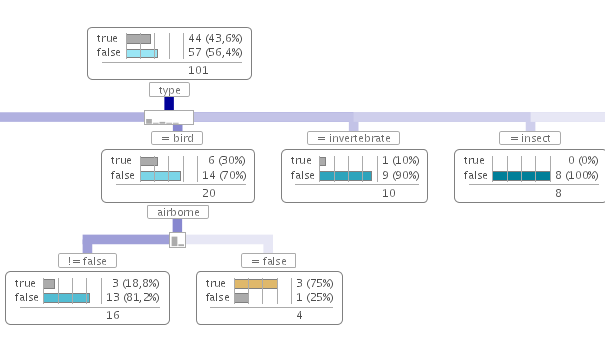
The next example modifies an existing model using a script by pruning selected nodes. Below is a screen shot of the tree structures before and after modification.
Example 30.2. Pruning selected nodes
# Description: modifies an existing model using a script
#  by pruning selected nodes

# list of node id's to prune
nodePruneList = [ 22, 47 ]

# check if model exists
if not exists('created_model'):
    raise 'please run first example for classification trees module'

# load the model
model = load('created_model')

# iterate over all leaves, the current leaf is assigned to
# leaf variable
for node in model.modelStatistics.allNodes:
    if node.nodeID in nodePruneList:
        node.isLeaf = 1

# save the modified model
save('created_model', model)