There are few fundamental procedures and one variable necessity in report engine usage:
startReport() - turn on report engine and start reporting
stopReport() - turn off report engine and stop reporting
__report__ - variable where report is stored
report(reportName) - procedure creates report in office suite
Example 25.1. Table split procedure report example:
# start reporting - turn on reporting process
startReport()

table 'sport_cars':

    name        weight      speed    cost
    'skoda'      1200        260    10.000
    'renault'    1360        280    10.500
    'opel'       900         240    8.200
    'VW'         1400        280    12.00
    'Fiat'       1450        260    7.800
    'Alfa Romeo' 1300        280    11.000

# This yields two tables - "sport_cars_part_1" and "sport_cars_part_2"
tableSplit('sport_cars', split=[1, 2], seed=124, output=['sport_cars_part'])

# stop reporting - turn off reporting process
stopReport()

# save report in repository
save('tableSplitReport',__report__)

# load report model from repository
model = load('tableSplitReport')
# print report to std.output
print model.getAll().get(0).getReportAsString()
Output:
SplitTable:
        Input table: sport_cars (6 rows)
        Output tables:
                sport_cars_part_1 (1 rows)
                sport_cars_part_2 (5 rows)
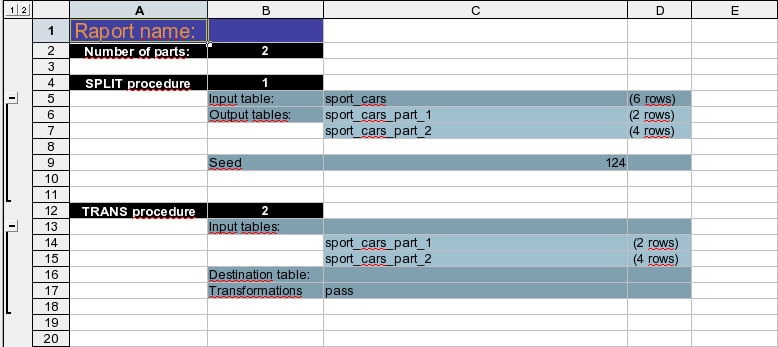
Main purpose of report engine usage is to generate report in office suite. Following script is an easy example which shows how to create report in office suite.
Example 25.2. Table split procedure report example:
# start reporting - turn on reporting process
startReport()

table 'sport_cars':

    name        weight      speed    cost
    'skoda'      1200        260    10.000
    'renault'    1360        280    10.500
    'opel'       900         240    8.200
    'VW'         1400        280    12.00
    'Fiat'       1450        260    7.800
    'Alfa Romeo' 1300        280    11.000

# This yields two tables - "sport_cars_part_1" and "sport_cars_part_2"
tableSplit('sport_cars', split=[1, 2], seed=124, output=['sport_cars_part'])

# do a trivial operation related to trans
trans None <- 'sport_cars_part_1','sport_cars_part_2':
    pass

# stop reporting - turn off reporting process
stopReport()

# this instruction will run office suite
report()
Report generated by above script