This tutorial shows how to carry ou a typical classification model testing process in AdvancedMiner. All quoted names are example names of created objects.
To test a model, it is necessary to:
-
have a model object in the repository
- the process of creating a model is described in the Model Building Guide tutorial.
- have access to the table in the database used during model building.
Assumption: in the following example, it is assumed that user has only a single model object in the MR repositiory, which was built during a certain model building process.
During the model testing process, the following MR objects are used:
- PhysicalData - an object describing the data used for building the model
- MiningTestTask - an object controlling the whole model testing process
- model - the result of the model building process

The model testing task consists of the following steps:
-
step 1:
- create PhysicalData ('german_credit_pd')
- we choose testing data: 'german_credit'
- step 2:
- create MiningTestTask -->> ClassificationTestTask ('TestTask')
-
we define that we are going to test
a classification model
-
step 2a:
- add the model
- we select the model that we want to test: 'MODEL'
-
step 2b:
- add testData
- we choose 'german_credit_pd' for PhysicalData of the data for model testing
-
step 2c:
- add testResult ('TestResults')
- we set the name of the object with the obtained testing results
-
step 2d:
- properties: set target attribute
- we define the 'Class' attribute as the target
-
step 2e:
- properties: set positive target value
- we set the value 'bad' as the positive target category
-
step 2a:
- step 3:
- execute task 'TestTask'
Note
- The schema described in this tutorial is common for all types of models (e.g. classification, approximation or clustering models). However, the exact results depend strictly on the type of the model.
If all the required objects were set up correctly, then after executing ClassificationTestTask a test results object should appear in the MR repository. The user can browse test results by expanding object icon and double-clicking contrained results ( see the movie ). The particular set of available statistics and evaluation measures depends on the model type. The Figure below shows the content of the MR repository and example test results created after carrying out previously described steps.
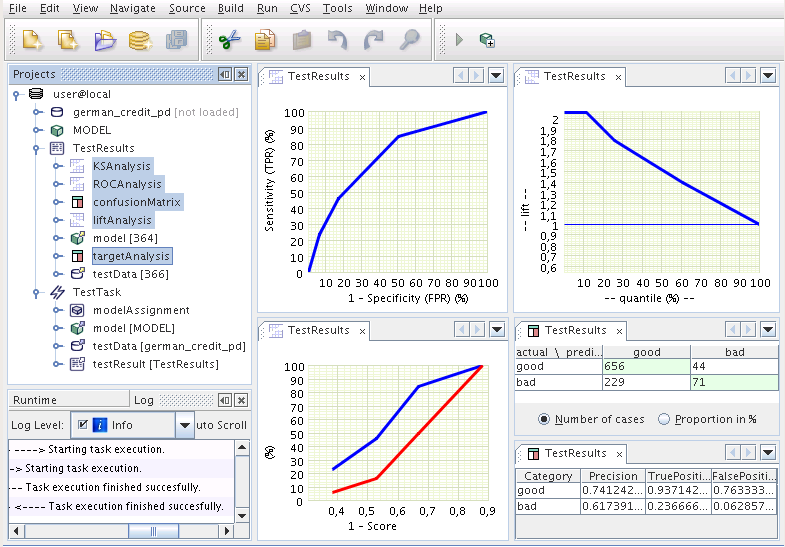
The steps described above can be also executed in a script.
Example 6.1. ModelTesting
#                           MODEL TESTING PROCESS
# -- we assume that a model named 'MODEL' has already been build and it exists in the repository

# step 1 -- create and save PhysicalData in MR
#        -- we choose the building data: 'german_credit'
PD = PhysicalData('german_credit')
save('german_credit_pd',PD)

# step 2 -- create MiningFunctionSettings -->> ClassificationFunctionSettings
#        -- we define that we are going to test a classification model
CTT = ClassificationTestTask()

# step 2a -- ClassificationTestTask: add model
#         -- we choose the model that we want to test
CTT.setModelName('MODEL')

# step 2b -- ClassificationTestTask: add testData
#         -- we choose the data for model testing
CTT.setTestDataName('german_credit_pd')

# step 2c -- ClassificationTestTask: add testResult
#         -- we set the object name of the obtained testing results
CTT.setTestResultName('TestResults')

# step 2d -- ClassificationTestTask - properties: set target attribute
#         -- we define the 'Class' attribute as the target
CTT.setTarget('Class')

# step 2e -- ClassificationTestTask - properties: set positive target value
#         -- we set the value 'bad' as the positive target category
CTT.setPositiveTargetValue('bad')

# steps 2,2a,2b,2c,2d,2e -- save ClassificationTestTask in MR
save('TestTask',CTT)

# step 3 -- execute task
execute('TestTask')

print "Done..."
Output:
Done...